
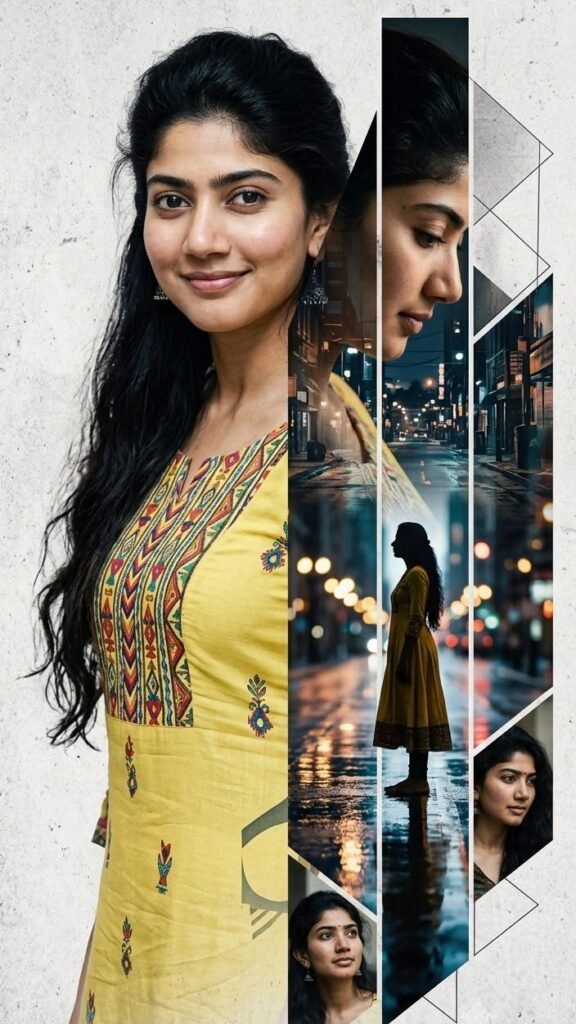
Cinematic AI Portrait Prompt: Create a Stunning Rainy City Editorial Photo
AI image generation has completely changed the way we create portraits. Today, you don’t need an expensive photoshoot, professional studio, or complicated editing software to create a cinematic editorial-style image. With the right reference photo and a detailed AI prompt, you can transform an ordinary portrait into a creative fashion-style composition.
The photo style featured in this guide combines a realistic portrait with a rainy nighttime city, wet-road reflections, cinematic lighting, multiple camera angles, and modern geometric framing. The result looks similar to a premium fashion magazine or cinematic photography project.
What Makes This AI Photo Style Special?
The main attraction of this concept is that several different visual elements are combined into one image. Instead of creating a simple portrait, the AI creates a complete visual story.
The main portrait appears large on one side of the composition, while the other side contains cinematic scenes of the same person. A rainy city street, nighttime lights, reflections, a side profile, and a full-body silhouette create a dramatic atmosphere.
Geometric white lines and angular frames separate the different scenes. This gives the final image a modern editorial and magazine-style appearance.
What You Need Before Creating the Image
You only need a clear reference photo and an AI image generator that supports image references. For the best facial results, choose a photo where the face is clearly visible and not heavily covered by sunglasses, filters, or shadows.
- A clear, high-quality reference photo
- A face that is clearly visible
- A compatible AI image generator
- The copy-paste prompt provided below
- A little patience if the first generation isn’t perfect
How to Use This AI Photo Prompt
Start by uploading the photo you want to use as your identity reference. Choose a sharp image with natural lighting and a clearly visible face.
Click the Copy Prompt button below. The complete prompt will automatically be copied to your clipboard.
Paste the copied prompt into your AI image generator. Make sure your reference photo is also attached before generating the image.
Generate the image and allow the AI to create the complete cinematic composition. For a vertical social-media image, a 9:16 aspect ratio is recommended.
AI-generated images can sometimes miss small details. If the face, clothing, composition, or geometric panels aren’t correct, simply generate another version using the same prompt.
Copy-Paste Cinematic AI Photo Prompt
Create an ultra-realistic cinematic editorial portrait using the uploaded reference photo as the ONLY identity reference.

Preserve the person's facial identity, natural facial proportions, skin texture, eyes, nose, lips, hairstyle, and overall appearance accurately. Do not change the person's identity or make the face look like a different person.

Create a sophisticated vertical magazine-style photographic collage.

The main subject is a beautiful South Asian woman wearing a traditional Indian yellow printed kurta with colorful ethnic geometric patterns. She has long, naturally flowing black hair and a subtle, genuine smile. Keep her expression natural, elegant, and confident.

Place a large, highly realistic close-up portrait of the woman on the left side of the composition, occupying most of the frame. Use soft natural lighting, realistic skin texture, detailed eyes, natural hair strands, and professional portrait photography.

On the right side, create several tall geometric vertical panels showing the same woman from different cinematic perspectives.

One major panel should show her standing alone on a rainy urban street at night, wearing the same yellow outfit. The street should be wet and reflective, with cinematic bokeh from streetlights, storefronts, traffic lights, and distant buildings.

Add another side-profile close-up of the woman looking slightly downward with a calm, thoughtful expression.

Include a full-body silhouette of the woman standing on the wet street, surrounded by reflections and soft nighttime city lights.

Add two or three smaller geometric portrait frames showing different natural angles of her face.

Use elegant white geometric lines, triangular shapes, and angular framing elements between the panels, creating a premium fashion-editorial collage aesthetic.

The overall mood should feel cinematic, emotional, sophisticated, artistic, and slightly dreamy.

Color grading: warm golden tones on the subject contrasted with cool blue tones in the rainy city background.

Lighting: realistic cinematic lighting, soft highlights, subtle shadows, realistic reflections, shallow depth of field, and natural bokeh.

Photography style: high-end fashion editorial, cinematic street photography, realistic portrait photography, premium magazine aesthetic.

Composition: vertical 9:16, carefully balanced asymmetrical layout, premium editorial design, clean geometric framing.

Ultra-photorealistic, highly detailed, realistic skin pores, individual hair strands, realistic fabric texture, natural facial features, realistic reflections, professional camera quality, 8K detail.

Avoid cartoon effects, plastic skin, artificial-looking faces, distorted facial features, unnatural eyes, excessive makeup, over-smoothed skin, duplicate faces, extra fingers, unrealistic anatomy, low-resolution details, and excessive AI artifacts.
How to Get a More Realistic Face
The reference photo is one of the most important parts of this process. If you want the generated portrait to look closer to your original photo, use a high-resolution image where the face is easy to see.
Avoid using a heavily edited selfie or a photo with extreme beauty filters. Natural facial details give the AI more useful information for maintaining consistent features.
If the first result changes the facial appearance too much, generate another version and emphasize that the uploaded image should remain the only identity reference.
Why the Rainy City Background Works So Well
Rain naturally adds depth and emotion to a cinematic photograph. Wet roads reflect streetlights and buildings, while nighttime lighting creates soft bokeh in the background.
The warm yellow clothing also creates an attractive contrast against the cool blue tones of the nighttime city. This warm-versus-cool color contrast helps the subject stand out from the background.
The Secret Behind the Magazine-Style Look
The geometric layout is another important part of this concept. Instead of placing one photo in the center, the composition divides the image into different visual sections.
The large portrait provides the main focal point. The side profile adds personality, the rainy street creates atmosphere, and the silhouette adds a sense of storytelling.
The white geometric lines connect all of these elements and make the image feel like a professionally designed editorial poster.
Best Aspect Ratio for This Image
A vertical 9:16 composition works especially well for this style because it provides enough height for the large portrait and multiple cinematic panels.
This format is also suitable for platforms where vertical images are commonly used, including Instagram Stories, Reels covers, Pinterest content, and other mobile-first social media designs.
Tips for Better AI Results
- Use a sharp and well-lit reference photo.
- Keep the face clearly visible.
- Avoid excessive beauty filters.
- Use the complete prompt instead of a very short description.
- Keep the identity instruction in the prompt.
- Generate multiple variations if necessary.
- Use a vertical 9:16 composition for the full editorial effect.
- For a different outfit, replace the clothing description in the prompt.
- For a different location, replace the rainy city description with your preferred environment.
Can You Change the Outfit?
Yes. The prompt can easily be customized. For example, you can replace the yellow traditional kurta with a saree, lehenga, western dress, denim outfit, or another fashion style.
However, if you want the same visual appearance as the example, keeping the yellow traditional outfit and colorful ethnic patterns will help maintain the original concept.
Can You Change the City?
Absolutely. You can replace the generic rainy urban street with almost any city or environment. You could create a rainy street in New York, London, Tokyo, Mumbai, Delhi, Paris, or another location.
The important part is to maintain the wet street, nighttime atmosphere, cinematic lighting, reflections, and depth-of-field effect.
Frequently Asked Questions
Yes. Upload your own clear photo and use it as the identity reference.
The prompt specifically asks the AI to preserve the reference identity, facial proportions, and natural facial details. Results can still vary depending on the image generator and the quality of the reference photo.
Yes. Simply replace the clothing description in the prompt with the style you want.
Yes. You can replace the city or environment description while keeping the same cinematic composition.
A 9:16 vertical ratio is recommended for this particular composition.
Generate another variation using the same prompt. A better reference image and a second or third generation often produce a more consistent result.
Final Thoughts
This cinematic AI portrait concept is a great way to turn a simple reference photo into a creative editorial-style artwork. The combination of a realistic portrait, traditional fashion, rainy streets, nighttime lighting, reflections, silhouettes, and geometric framing creates a visual story rather than just another AI-generated portrait.
The best part is that the prompt can be customized. You can change the outfit, city, weather, colors, lighting, or overall mood while keeping the same editorial composition.
If you are experimenting with AI photography, save this prompt and use it as a starting point for your own creative portraits.
Upload your photo, copy the prompt, paste it into your AI image generator, and create your own cinematic rainy-city portrait.